Huntress CTF 2025 - Trust Me
Challenge Description
C’mon bro, trust me! Just trust me!! Trust me bro!!!
The
TrustMe.exeprogram on this Windows desktop “doesn’t trust me?”It says it will give me the flag, but only if I “have the permissions of Trusted Installer“…?
Thought process:
We are give a RDP connection and there is a file TrustMe.exe
When we try to execute it we get this:
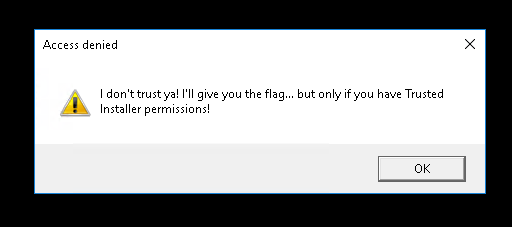
After searching for Trusted Installer, ctf and writeup
I came accross this video from John Hammond: https://www.youtube.com/watch?v=Vj1uh89v-Sc
But in that video he was able to just execute commands in cmd, so i transfer this file from rdp to my host machine and started static analysis.
always make backup copy of the file you are working with to not mess with its integrity:
cp TrustMe.exe TrustMe.exe.orig.exe
cp TrustMe.exe TrustMe.exe.patched.exe
While doing static analysis i came across mentions of C:\ctf\key.bin
And then I remembered the video of John, the file is also “owned” by TrustedInstaller so we can use what we learned in that video to read it as TrustedInstaller.
sc.exe config TrustedInstaller binpath= '"C:\Windows\System32\cmd.exe" /c type "C:\ctf\key.bin" > "C:\Users\Public\key.bin"'
started the service

> sc.exe start TrustedInstaller
And inspected the bytes:
# prints hex bytes
Get-Content -Path C:\Users\Public\key.bin -Encoding Byte -ReadCount 0 |
  ForEach-Object { ($_ | ForEach-Object { "{0:X2}" -f $_ }) -join " " }
And we get this:
C5C93BDB841534FAE5545EDCB0F12041D10CD4D90EE16A7D8235FA657C93825D
AES key? That sounds important!
But this was probably rabbit hole because there were 2 bytes missing from the encrypted string that is at the start of the file that i belive is encrypted flag Wx6eETGXddnmCT4qZ7BxgRYpC+kdjjFzXxW+BM4HiI3GPaslpFBnpk9XplnaSxNg
Because after Decrypting the string with the key we get this
95d526595e62cf1f4d82a}
After solving the challenge i checked and in fact it was the right flag just missing some characters for now I am not sure why.
So now we are at the starting line again
After going through disassembly code I found this:
0x140001468 cmp dword [IsMember], r14d
0x14000146d 75 31 jne 0x1400014a0
0x75 0x31 is jne +0x31. We could changed 0x75 → 0xEB (opcode for jmp short) leaving the relative offset 0x31 unchanged. The two‑byte instruction length is preserved.
Byte-level change:
- VA:
0x14000146d - Original bytes:
75 31 - Patched bytes:
EB 31
This will turns jne 0x1400014a0 into jmp 0x1400014a0 (i.e., unconditional branch to success block).
r2 -w -c 's 0x14000146d; px 2; wx eb; px 2; wq' TrustMe.exe.patched.exe
Now we can copy the patched file to the RDP and run it:
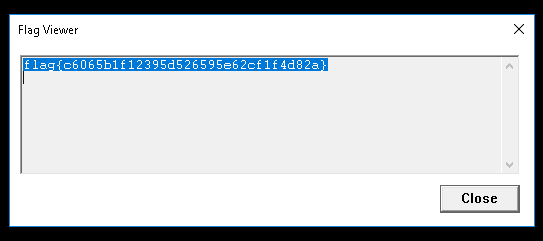
I am pretty sure there is much more easier way to solve this challenge and I belive this isn’t intended way to solve it